RosterApps Timecard
25+Paying Users UserScriptPayroll calculator for airline workers on a legacy timecard system.
I built a JavaScript tool that scrapes the RosterApps timecard, applies complex pay-code rules, and outputs take-home pay instantly. It spread through word-of-mouth and 25+ coworkers paid for it.
Problem
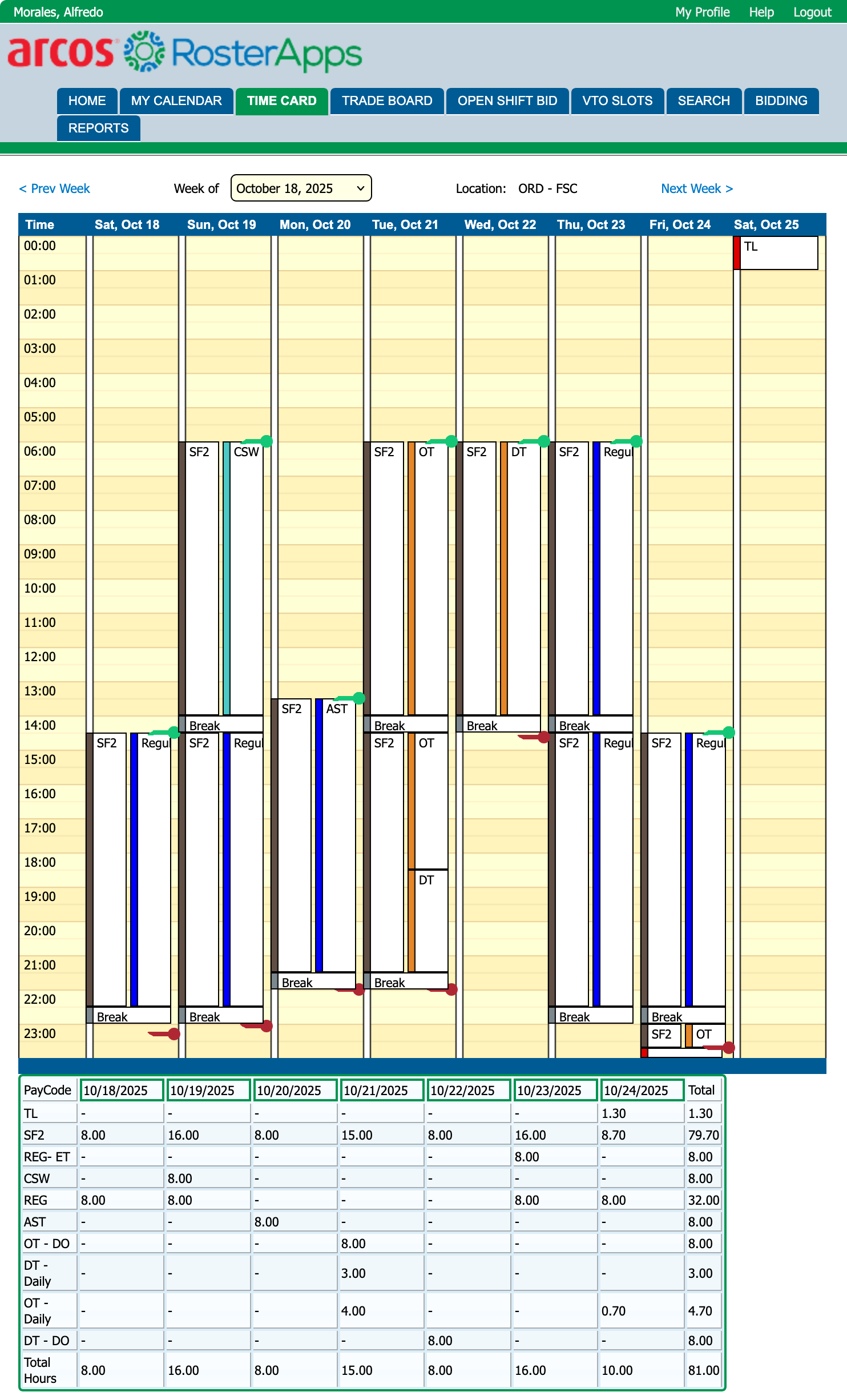
At O’Hare Airport, our legacy timecard system showed raw hours and pay codes and did not show what you would actually be paid. Converting hours into take‑home pay required tracking 15+ different pay codes, shift differentials, overtime rules, and double‑time thresholds.
Every pay period I’d manually do the math. It was slow, error-prone, and made it hard to plan finances or decide whether picking up an extra shift was worth it.
I intentionally kept this backend-free and local, focusing on getting the numbers right and keeping it usable instead of adding infrastructure that wasn’t needed for the problem.
Solution
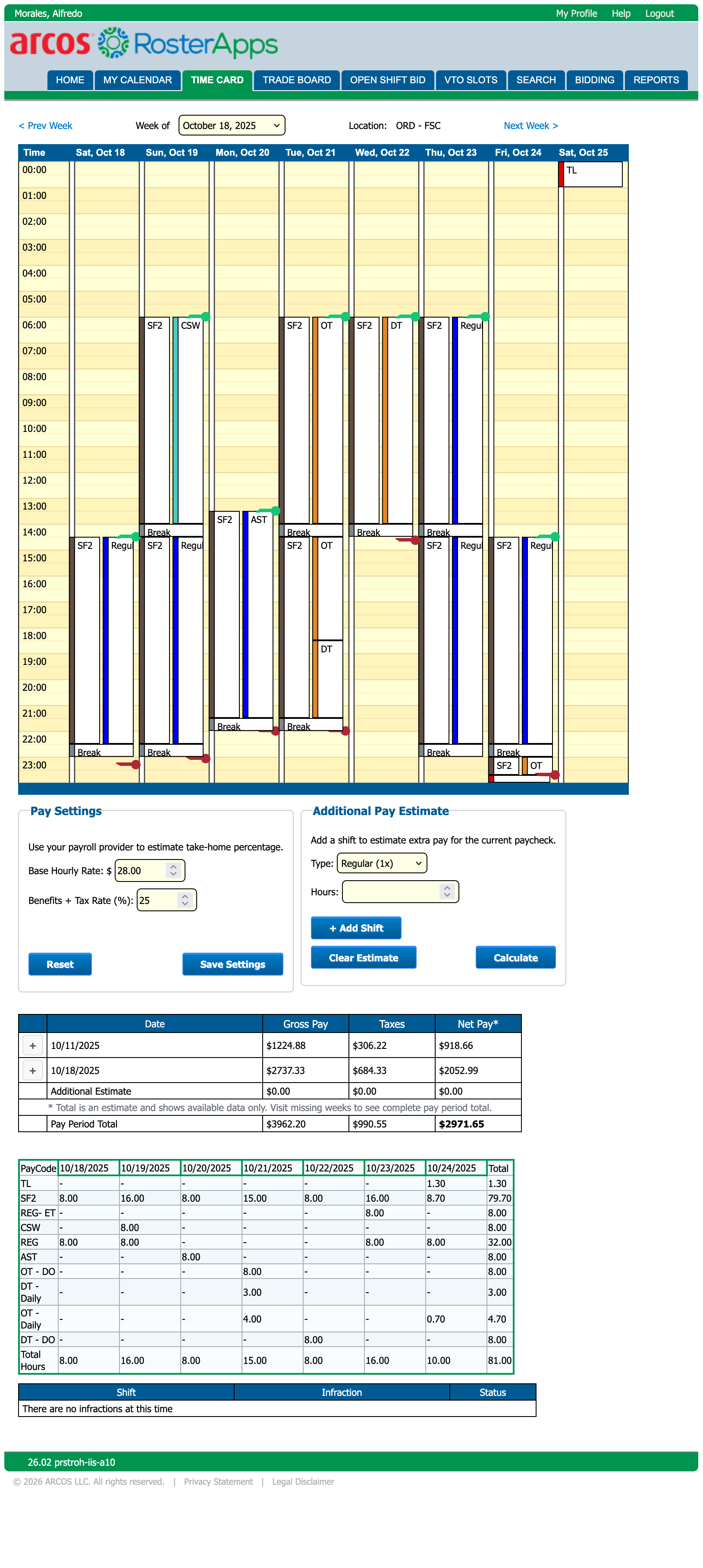
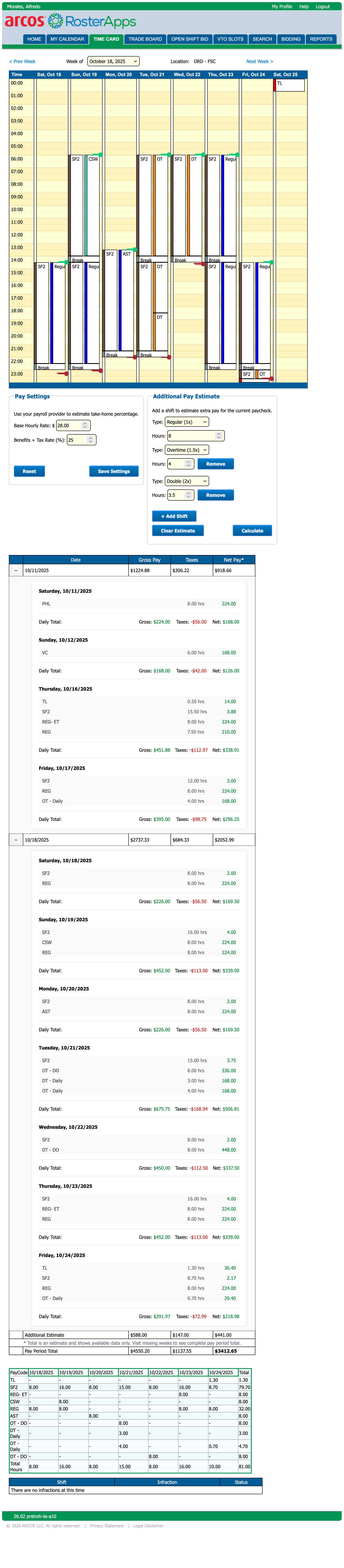
I built a UserScript that scrapes the timecard table, maps each pay code to its correct multiplier or differential, and outputs clear totals. It also aggregates the two-week pay period and shows a breakdown by day.
Coworkers saw me using it and asked for copies. I handled installs and updates directly. Eventually 25+ people paid for it through word‑of‑mouth.
What I learned
I built this for myself first, then iterated based on coworker feedback. It spread fast, and people ended up paying for it.
How it works
Tool in action
Same pay period, with the UserScript enabled. Collapsed mode keeps the host page readable; expanded mode shows the full day-by-day breakdown and shift estimator.
Challenges & solutions
Complex pay code multipliers
15+ pay codes with different calculation methods: some are time-based multipliers (1x, 1.5x, 2x), others are fixed differentials, and some are non-paid leave codes that must be excluded.
Built a pay-rate mapping layer that classifies codes as multiplier vs differential, explicitly filters non-paid codes, and keeps the blast radius small when new codes appear.
Bi‑weekly pay period aggregation
The system shows one week at a time, but paychecks are bi‑weekly. I needed to pair the correct weeks, cache both, and aggregate totals even when a user hasn’t visited both week pages yet.
Implemented week pairing logic (odd/even week math) and cached each week separately in LocalStorage. The UI surfaces missing-week states without corrupting totals.
Non‑technical installation + support
Users were airline ramp agents. Installation had to be simple, with sensible defaults, and configuration optional.
Packaged as a UserScript compatible with common managers. I kept the settings panel always available, but the tool works out-of-the-box with defaults and validation.
Validation & correctness
I validated calculations by comparing outputs against real paychecks across multiple pay periods, including overtime, holidays, and shift differentials.
Edge cases like year boundaries, missing weeks, and partial cached data were tested explicitly to keep totals consistent and reproducible.
Results & impact
Eliminated manual calculations: Workers no longer needed spreadsheets or calculators to estimate paychecks.
Improved financial planning: Seeing take‑home pay before payday helped budget and reduced uncertainty.
Shift bidding decisions: The estimator made the pay impact of extra shifts obvious and fast to evaluate.
Validated willingness to pay: I sold it directly to coworkers with no marketing, just word-of-mouth.
I considered scaling this into a licensed product, but the underlying platform was scheduled for migration. I chose to validate demand quickly, keep distribution simple, and move on rather than over-invest in infrastructure.
Tech stack
Radiating Warmth
A production booking and payments system rebuilt from Wix that focuses on real business constraints, Stripe‑backed payments, and reliable operational workflows.